

Skip to content

What’s New at Level Data

New ways to turn district data into action.

Explore the latest Level Data products, features, and improvements — built to simplify critical district work, strengthen visibility, and help teams make more informed decisions.

Explore Latest Updates ↓ View Release Notes →

Explore by product

Brolly Grow ROI Validation Integrations

Featured release

Go beyond the 504 plan.

See whether accommodations are actually being delivered — not just documented.

New features

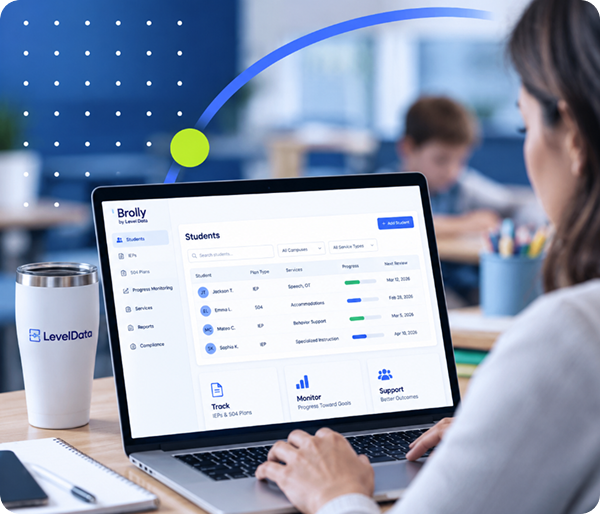
Brolly

Simplify special programs. Improve visibility. Support better outcomes.

Explore Brolly →

New · Texas

Brolly TierScore

Help Texas special education teams complete HB 2 Tier of Intensity funding assessments without adding more paperwork.

Explore TierScore →

New · AI

AI Insights

Bring assessment scores, trend data, and teacher notes together to surface patterns and give teams a clearer view of student information.

Explore AI Insights →

New product

Brolly 504

Document accommodation delivery, maintain timestamped records, and connect implementation with student progress.

Explore Brolly 504 →

New · October

Provider-Level Service Documentation

Providers get one digest of assigned services that are missing expected documentation, so teams catch gaps early without adding to the inbox.

Read the Release Notes →

New · October

Service Tracking Parent Summaries

Attach parent summaries to Service Tracking reports to share clear, family-friendly context alongside service information.

Read the Release Notes →

New · October

Brolly 504 Data Exploration

See 504 activity by user and by student, filtered by date, school, and grade, to confirm accommodations are delivered and documented.

Read the Release Notes →

New features

Grow

Connect educator development, coaching, and district priorities.

Explore Grow →

New

Educator Supports Module

Bring professional development and coaching information together with student outcomes for greater district-level visibility.

Explore Educator Supports →

New

Educator Evaluation Calculator

Use observation and coaching data already captured in Grow to support summative educator ratings and streamline evaluations.

Explore the Calculator →

Texas

Instructional Insights

Bring coaching, walkthroughs, observations, and professional development together to support TEA’s Instructional Insights Analytics initiative.

Explore Instructional Insights →

New · October

Observation Follow-Up Meetings

The Observation Data Report now shows whether a follow-up meeting was scheduled or linked to each observation.

Read the Release Notes →

New · October

District Score Breakdown

Each teacher’s summative evaluation score now expands to show the inputs, weights, and formula behind it, and flags missing components.

Read the Release Notes →

New · October

ClassLink SSO Certificate Updates

Grow now pulls updated ClassLink certificates automatically, so single sign-on keeps working without manual updates.

Read the Release Notes →

New features

Return on Instruction (ROI)

Keep strategic priorities visible and connect investments to impact.

Explore ROI →

Featured capability

Strategy Tracking

Keep strategic priorities visible after the plan is created. Track objectives and action items in one place, with clear ownership assigned to each one.

Explore Strategy Tracking →

Strategic plan progress

Improve student outcomes · 78%

Expand tiered supports · 62%

Strengthen educator growth · 86%

New

School Improvement Plans

Build and manage ESSA-aligned School Improvement Plans alongside broader district strategy.

Explore School Improvement Plans →

New · AI

AI Insights

Bring assessment results, accountability scores, and progress toward state-mandated goals into a more digestible view.

Explore AI Insights →

New

Push Insights

Send key updates directly to team members by email, with links back into ROI for deeper context.

Explore Push Insights →

New

Executive Summaries

Bring district-level utilization and impact information together in a clear leadership view.

Explore Executive Summaries →

New

Student Scorecards

See program usage and student growth together at the individual student and subgroup level.

Explore Student Scorecards →

New · October

Program Inventory

A current and historical record of district programs, with usage data imported each year and annual program spending in one place.

Read the Release Notes →

New · October

Inventory Comparison

Compare programs side by side with charts for utilization, total cost, and underutilized spending to support budget decisions.

Read the Release Notes →

New · October

Links to Legacy eROI Reports

Open legacy eROI resource reports directly from Strategic Objectives, without navigating away.

Read the Release Notes →

New features

Validation & Integrations

Connect, validate, and trust district data across systems.

Explore Data Management →

New

Integration Connector Portal

See district connections and data pipelines in one place, with clearer visibility into what is connected and where attention may be needed.

Explore the Connector Portal →

New

Non-SIS Validation

Extend Level Data Validation beyond SIS data to Special Education, Transportation, Nutrition, and additional district systems.

Explore Non-SIS Validation →

New

Validation for Synergy

Bring Validation into the Synergy interface so teams can check data without moving into a separate workflow.

Explore Validation for Synergy →

Coming soon

More support for the work Special Programs teams manage every day.

Upcoming Brolly capabilities will bring more of the student-support workflow into one connected system.

Brolly Behavior

Connect FBA documentation, BIP authoring, implementation, and progress monitoring in one workflow.

Brolly ELL

Track ELL compliance from identification through the two-year post-exit monitoring window alongside IEP and 504 implementation.

MTSS

Support student identification, tiered intervention documentation, and progress monitoring without disconnected spreadsheets.

See What’s Coming to Level Data

Looking for every update?

Explore detailed release notes for product enhancements, improvements, and newly released capabilities.

See what these updates could mean for your district.

Get a personalized walkthrough of the latest Level Data capabilities and see which updates are most relevant to your district’s priorities.

Schedule a Conversation →
Back To Top